
Download Instalink Software – Instadose, radiation monitoring, dose badge scanner, Bluetooth, Mirion, dose data transmission, Windows app, radiation safety
Overview
Instalink Software is a specialized Windows desktop application engineered to support radiation safety professionals by enabling seamless scanning and reading of Instadose devices or badges via Bluetooth. Designed for use in environments where accurate and timely radiation exposure tracking is critical, the software serves as a bridge between physical dose badges and central monitoring systems. Its primary function is to collect dose data from Instadose devices and transmit it securely to Mirion servers, ensuring compliance with safety protocols and regulatory standards.
The application targets radiation safety officers, health physicists, and personnel in industrial, medical, and nuclear facilities who require reliable tools for managing personal radiation exposure records. By eliminating manual data entry and reducing the risk of human error, Instalink Software enhances operational efficiency and data integrity. The software’s role in the broader radiation safety ecosystem is significant, as it supports real-time monitoring and reporting—key components in maintaining workplace safety and regulatory compliance.
Although the developer did not provide additional technical details about the organization behind Instalink Software, the app’s focus on secure data transmission and integration with Mirion servers suggests a specialized, industry-focused development effort. Real-world use cases include routine badge scanning in healthcare settings, post-incident exposure verification, and compliance reporting for regulatory audits. The software’s presence on the Windows platform underscores its deployment in professional environments where desktop stability and data security are paramount.
Key Features & Functionality
- Bluetooth Connectivity: Instalink Software leverages Bluetooth technology to establish wireless communication with Instadose devices. This eliminates the need for physical cables, allowing users to scan badges quickly and efficiently from a short distance. The connection is designed to be stable and automatic, reducing setup time and improving workflow continuity.
- Data Transmission to Mirion Servers: Once a badge is scanned, the software initiates immediate transmission of dose data to Mirion servers. This real-time transfer ensures that exposure records are updated promptly, supporting timely decision-making and incident response. The secure channel minimizes data loss and unauthorized access.
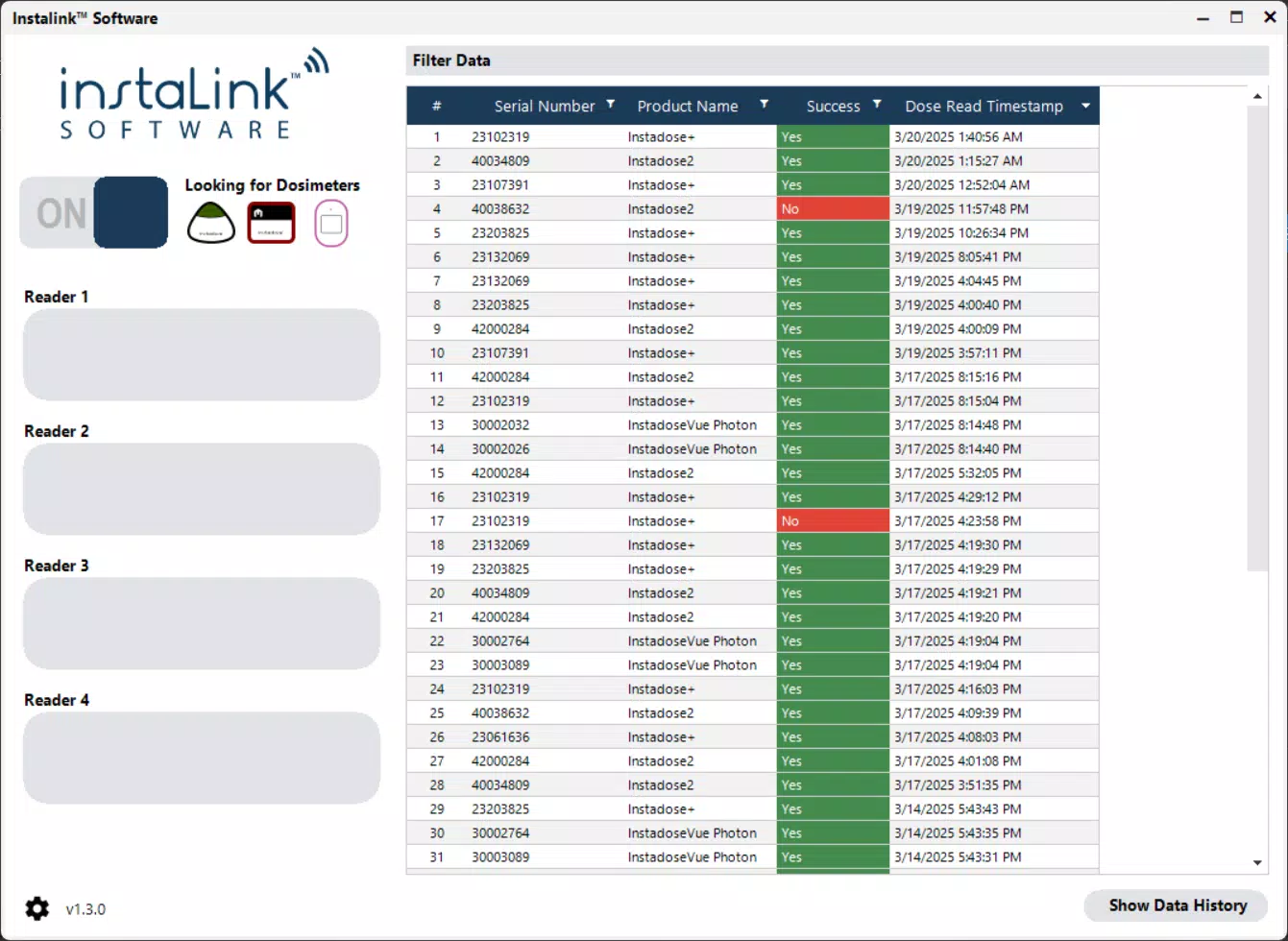
- User-Friendly Interface: The application features an intuitive layout with clear navigation and visual cues. Even users with limited technical experience can perform scanning tasks with minimal training. On-screen prompts guide the user through each step, reducing the likelihood of operational errors.
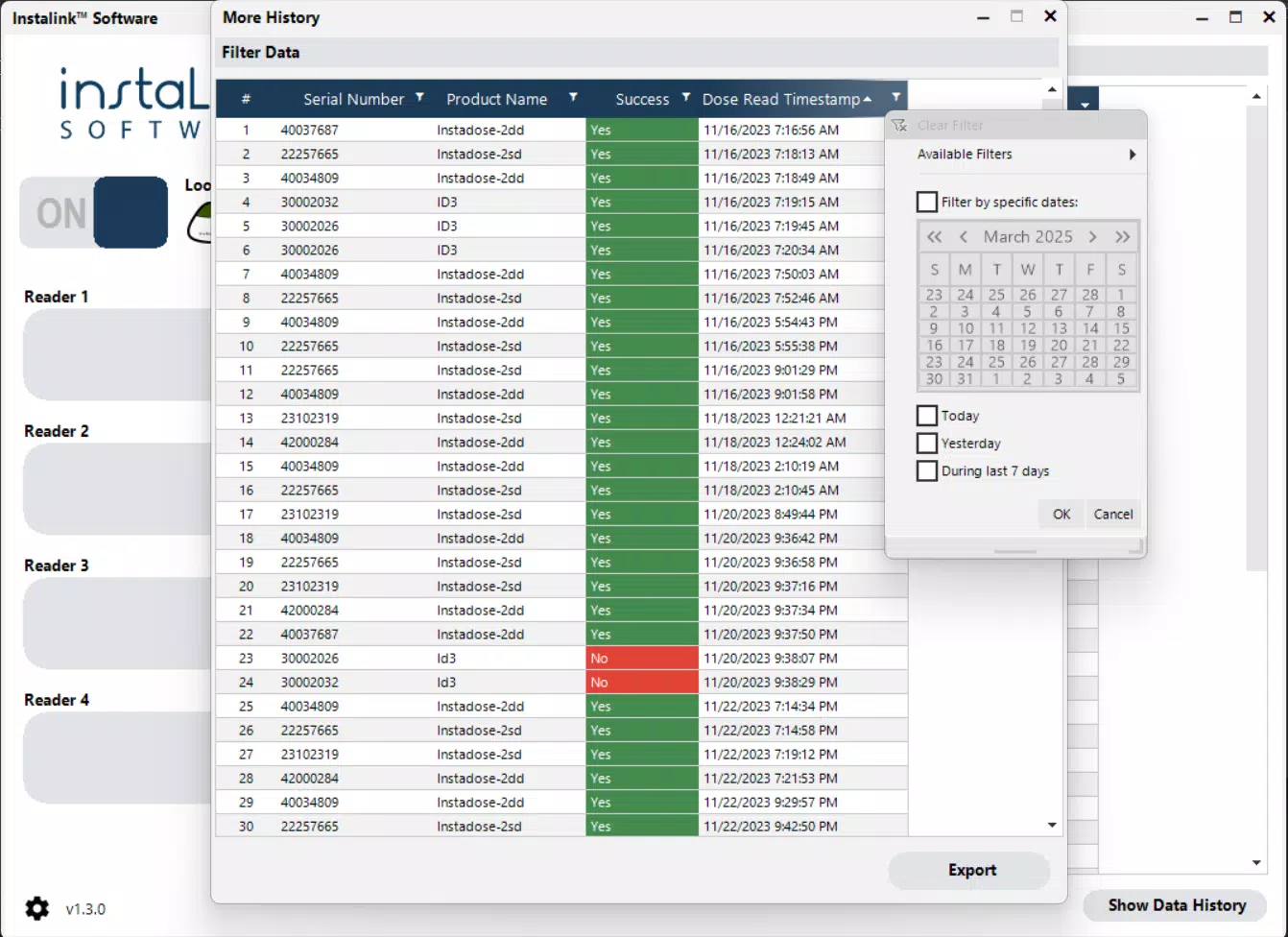
- Enhanced Reporting Capabilities: Instalink Software consolidates data from multiple badges into unified reports. These reports can include exposure trends, individual dose summaries, and compliance status, which are essential for safety assessments and regulatory documentation.
- Robust Performance with Large Datasets: The software is optimized to process and manage large volumes of dose data without performance degradation. This ensures consistent operation during high-demand periods, such as routine monthly scans or post-event audits.
For example, a hospital radiation safety officer can use the software to scan dozens of badges in a single session, transmit the data in real time, and generate a compliance report within minutes. This capability significantly reduces administrative burden and improves response times in safety-critical scenarios.
Interface, UX & Performance
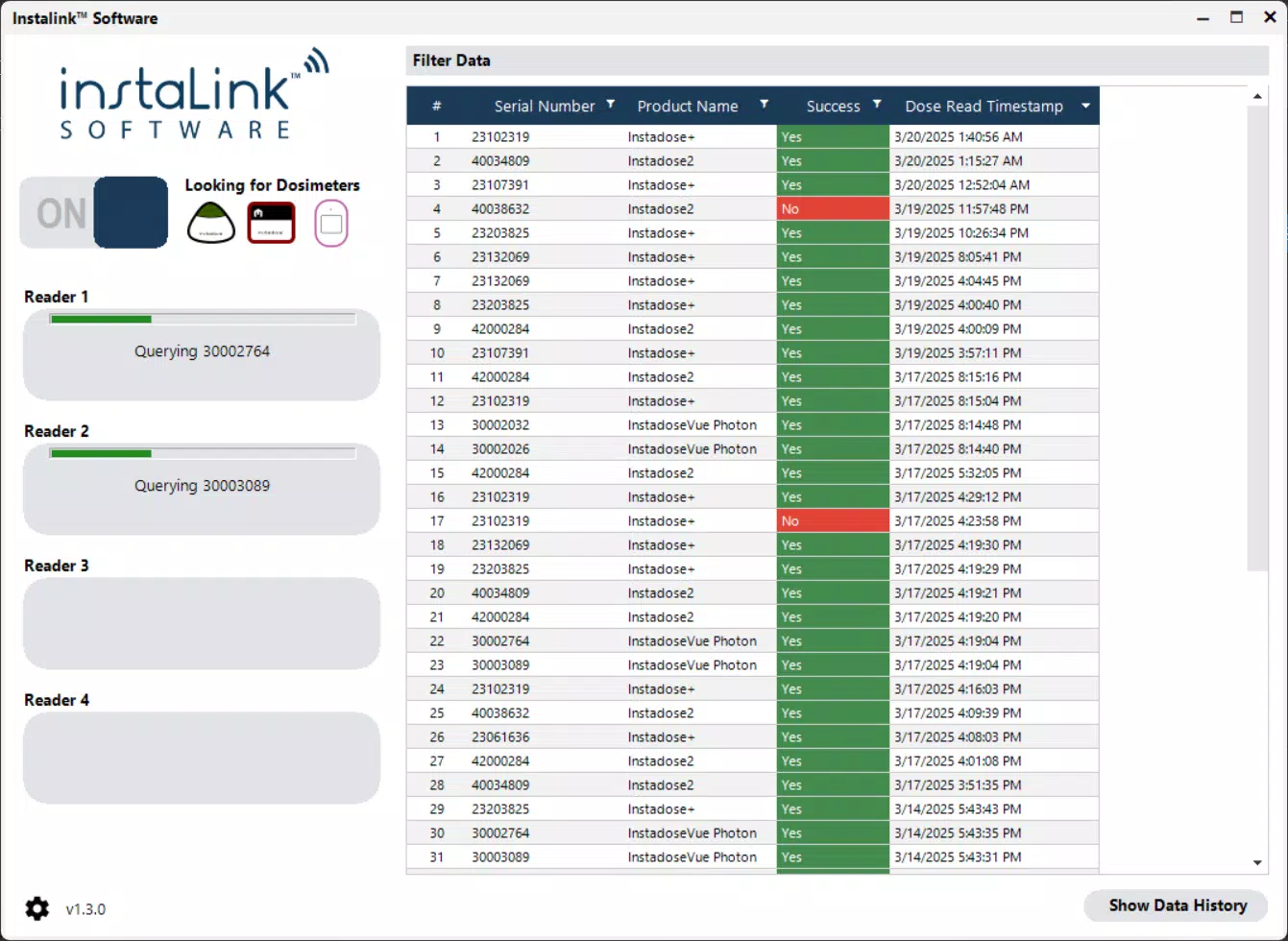
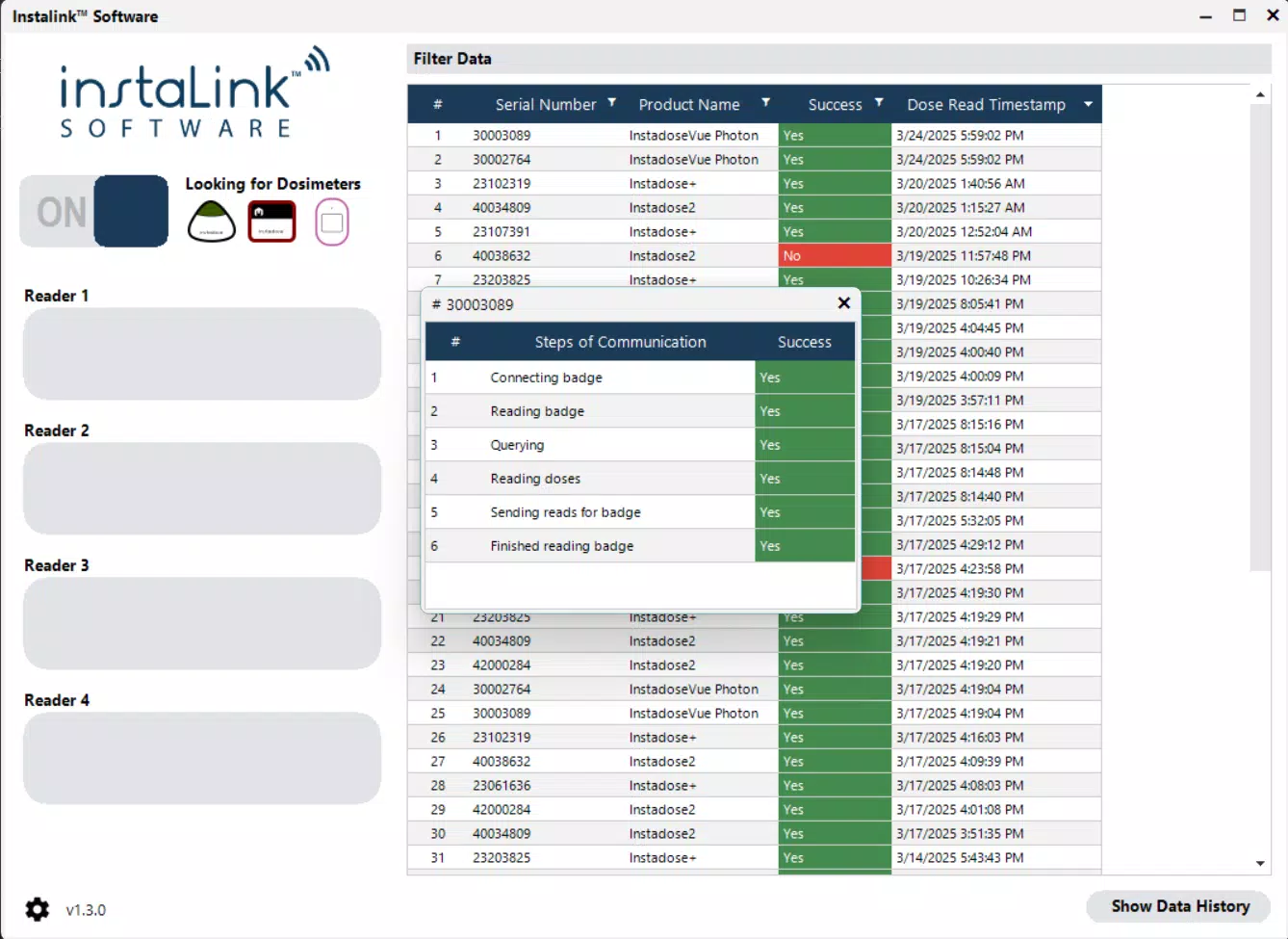
Instalink Software presents a clean, functional interface designed for clarity and ease of use. The layout prioritizes essential actions—such as initiating a scan and viewing transmission status—on the main screen, minimizing user navigation complexity. Visual indicators, such as status lights and progress bars, provide immediate feedback during data transfer, enhancing user confidence in the process.
Navigational flow is linear and logical, guiding users from device pairing to data transmission with minimal steps. The application maintains consistent design language across all screens, contributing to a professional and trustworthy user experience. Although the developer did not list formal performance metrics, the software is designed to operate efficiently on standard Windows desktop systems, ensuring compatibility with common workstations used in safety departments.
Responsiveness is maintained during scanning and transmission, with no reported delays in processing or feedback. Stability is a key focus, as interruptions in dose data collection could compromise safety monitoring. The software is built to handle background operations without affecting system performance, allowing users to continue other tasks while data is being processed.
Platform Compatibility & Technical Requirements
Instalink Software is designed exclusively for the Windows platform. It is compatible with current versions of Windows operating systems, though specific requirements were not listed by the developer. The application has a file size of 25.4 MB, indicating a lightweight footprint suitable for installation on standard desktop environments.
The software version is 1.0.1, released on April 15, 2024. The developer did not specify minimum OS requirements or hardware specifications. However, given its focus on Bluetooth communication and data transmission, it likely requires a Windows system with built-in Bluetooth support and a stable internet connection for server communication.
Pros and Cons
Pros
- Seamless Bluetooth integration for wireless badge scanning
- Real-time transmission of dose data to Mirion servers
- Intuitive interface suitable for non-technical users
- Efficient handling of multiple dose badges and large datasets
- Free to download and use, reducing operational costs
Cons
- Platform is limited to Windows; no support for macOS or Linux
- Specific system requirements were not disclosed
- Not available as a mobile app; restricted to desktop use
- Compatibility with older Windows versions is unclear
- Developer did not provide update frequency or changelog details
FAQ
Is Instalink Software safe to use?
The software is designed for secure data transmission and is intended for use in regulated radiation safety environments. It communicates with Mirion servers using established protocols, ensuring data integrity and confidentiality.
Can I use Instalink Software on multiple devices?
Yes, the application can be installed on multiple Windows machines, provided each system meets the required specifications. However, the developer did not specify licensing terms or device limits.
Does Instalink Software require an internet connection?
Yes, an active internet connection is required for data transmission to Mirion servers. The software cannot function fully offline.
Is the software available for mobile platforms?
No, Instalink Software is currently available only for Windows desktop systems. There is no version for Android or iOS devices.
How often should I update the software?
Updates are recommended to maintain compatibility and security. However, the developer did not disclose update frequency or automatic update capabilities.
Final Thoughts
Instalink Software delivers a focused, reliable solution for radiation safety professionals who rely on accurate dose data from Instadose badges. Its Bluetooth connectivity, real-time data transmission, and user-friendly interface make it a valuable tool in maintaining compliance and protecting personnel in high-risk environments. While its Windows-only availability limits accessibility, the app’s performance, ease of use, and free pricing model make it a strong choice for organizations already operating within the Windows ecosystem.
For radiation safety officers, medical facilities, and industrial safety teams, Instalink Software offers a streamlined workflow that reduces manual effort and enhances data accuracy. Its integration with Mirion servers ensures that exposure records are securely stored and readily accessible for audits and reporting.
Download Instalink Software now


